Best Hardware for Dutchie POS and What Each Register Costs
Best hardware for Dutchie POS from Dutchie's own supported list, priced at $900 to $2,450 a register. Why iPads, Bluetooth printers and USB cash drawers do not work.
By the Dispensaries team
October 2026 · 8 min read
Try the licensed dispensary finder
Press Find dispensaries to see licensed shops near .
Searching licensed dispensaries near ...
example listings ·
Sorted by distance
Not medical advice · 21+ · check your local laws
These shops, ratings, prices and deals are examples that show how a listing looks.
The short answer
The best hardware for Dutchie POS is a Windows all-in-one computer with at least 8GB of RAM, an Epson TM-M30 or Star mC-Print3 receipt printer, a Zebra DS2208 2D scanner, a 16 by 16 inch cash drawer wired to the printer, and a Zebra ZD-series label printer if your state requires package labels. Every one of those is on Dutchie's own recommended hardware list, last updated August 14, 2026. Priced part by part, a basic register comes to roughly $900 to $2,450, and a register that also prints labels and weighs product comes to roughly $2,040 to $5,350.
The more useful half of the answer is what not to buy. Dutchie's documentation says its Register web application is not compatible with iPads, Android tablets or Chromebooks, does not support Bluetooth printers, and will not open a cash drawer over USB. Stores that buy hardware before reading that list are the ones that end up buying it twice.
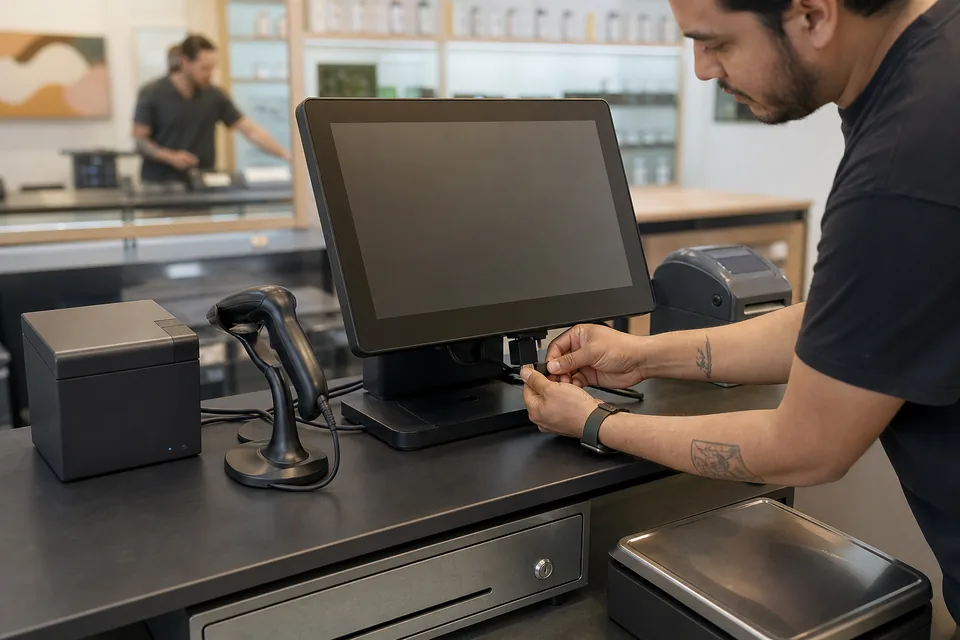
What hardware does Dutchie POS support?
Dutchie publishes two lists. One covers the Register web application, which is what most stores run in Chrome on their own computer. The other covers the branded Dutchie Register terminal, an Elo device. The peripherals overlap almost completely. This table is the web application list, with the price bands we track on our dispensary POS hardware cost page.
| Piece | What Dutchie recommends | Typical price | The catch |
|---|---|---|---|
| Register computer | Windows all-in-one PC (recommended), desktop or laptop, or a Microsoft Surface with an Intel processor. Minimum 8GB of RAM | $500 to $1,200, our estimate from general retail listings | Surface Pro X and any device with an ARM or Snapdragon processor are not supported |
| Receipt printer | Star Micronics mC-Print3, Epson TM-M30II, TM-M30II-H, TM-M30II-NT, TM-M30III or TM-M50 | $200 to $600 | No Bluetooth. The Star TSP100 still works but is discontinued, with limited support |
| Barcode and ID scanner | Zebra DS2208, DS2278, CS6080, CR6080 or H-6672 | $100 to $250 | Only 2D scanners can scan IDs. A 1D scanner reads product barcodes and nothing else |
| Cash drawer | APG 16 by 16 inch Vasario or Star 16 by 16 inch | $90 to $400 | Must connect by RJ12, RJ11 or CD-101a cable. USB drawers are not compatible |
| Label printer | Zebra ZD410, ZD411, ZD420, ZD421 or GK420d | $200 to $800 | ZPL is the only supported label language. The Dymo LabelWriter 450 Twin Turbo is listed as not compatible |
| Scale | A&D FX-300iN, FX-1200iN, EK-1200iN or GF-6000N, all NTEP models | $950 to $2,100 | Supported only over a serial-to-USB connection with specific adapters |
| Customer-facing display | espresso 13 inch, InnoView portable monitor, SideTrak Solo Pro, Elo 10 inch, or any external display | Varies widely | Needs a spare USB-C or HDMI port on the register |
Device lists are from Dutchie's help center articles "Recommended hardware for the Dutchie Register web application" (updated August 14, 2026) and "Compatible hardware for the Dutchie POS Register terminal" (updated June 24, 2026). Dutchie does not publish hardware prices. The price bands are the ones we collected from POS vendors and distributors for our hardware page, rounded, and the computer figure is our own estimate. Treat them as budgeting ranges, not quotes.
Can you run Dutchie POS on an iPad?
Not as a general rule. Dutchie lists the Apple iPad under "what's not compatible" for the Register web application, together with Android devices and Chromebooks from any manufacturer. There is a Dutchie Register iPad app, but Dutchie's setup article says it exists so that dispensaries that previously used Greenbits can keep their existing hardware, and it tells everyone else to keep using Windows devices with the recommended peripherals.
That is worth knowing before a hardware order, because tablets are the default assumption in cannabis retail and several competing systems are built around them. If you are moving to Dutchie from an iPad-based POS, plan on replacing the register computers, and check which of your printers and scanners are on the list above. An iPad is still needed in one place: the Dutchie E-Commerce Order Terminal app, which receives and prints online orders, requires an iPad from 2019 or newer and a Star mC-Print3 printer with a specific part number.
What does Dutchie POS hardware cost per register?
Between about $900 and $2,450 for a register that takes payment and prints a receipt, and between about $2,040 and $5,350 for one that also prints package labels and weighs product. Those totals add up the bands in the table: computer, receipt printer, scanner and cash drawer for the basic kit, then a label printer and an NTEP scale on top.
| Register type | What is in it | Low | High |
|---|---|---|---|
| Basic checkout | Windows all-in-one, receipt printer, 2D scanner, cash drawer | $890 | $2,450 |
| Checkout with labels | Basic kit plus a Zebra label printer | $1,090 | $3,250 |
| Deli-style counter | Basic kit plus label printer and NTEP scale | $2,040 | $5,350 |
| Fulfillment station | Computer, scanner and a shared ticket printer | $800 | $2,050 |
Two things move the total more than brand choice. The first is whether you need the scale at all. In states where everything arrives pre-packaged, no register needs one, and that removes the single most expensive line. The second is how many registers you open. Dutchie's own setup documentation says you can add as many Registers as you need with no additional subscription fees, so on Dutchie the cost of a fifth register is its hardware, not a fifth software seat. The software side of the bill is covered on our Dutchie pricing page.
Vendor bundles for dispensary registers are commonly reported at $2,500 to $6,000 each. If a bundle quote lands well above your own part-by-part total, ask what it adds: imaging, cabling, on-site installation and a single warranty contact are real, but they should be named. Our breakdown of what a dispensary POS bundle includes goes through that comparison line by line.
Where should you buy Dutchie-compatible hardware?
Dutchie names PLS and Venture as its supplier partners in the United States, with Connection also listed for the Register terminal, and recommends buying from them to make sure devices are compatible. It adds that devices from third-party suppliers may not be compatible. In practice the risk is narrow: the models on the list are standard retail hardware sold everywhere, and what goes wrong is a near-match, such as a Bluetooth-only printer variant or a USB cash drawer.
So the sensible approach is to buy exact model numbers. Get a quote from one of the named suppliers, then price the same part numbers elsewhere. For a multi-store rollout, where one wrong SKU is multiplied by every register, it is worth running the order as a proper tender and letting a procurement tool collect and compare the supplier quotes against one itemized list. Whoever you buy from, ask for the receipt printer interface and the cash drawer cable in writing.
What network does Dutchie POS need?
A wired one, sized to your register count. Dutchie recommends that every stationary register is hardwired with Cat5e or better, and publishes minimum speeds that should be dedicated to the POS alone.
| Store size | Orders a day | Minimum download | Minimum upload |
|---|---|---|---|
| 1 to 5 registers | Up to 250 | 20 Mbps | 10 Mbps |
| 6 to 10 registers | 250 to 1,000 | 50 Mbps | 20 Mbps |
| 11 or more registers | Over 1,000 | 100 Mbps | 30 Mbps |
The same article, updated June 12, 2026, says Dutchie does not provide networking hardware or services, and that the POS should sit on its own isolated network or VLAN with no cameras, phones or personal devices on it. That means the router, switch and cabling are your purchase and your IT contact's job, and they belong in the hardware budget. If Wi-Fi is unavoidable, Dutchie asks for the 5GHz band. A store that cannot hold those speeds should also read our guide to dispensary POS offline mode before opening day.
Do you need extra hardware for kiosks and online orders?
For online orders, yes: full-stack customers who use both Dutchie POS and Dutchie E-Commerce should have at least one Order Terminal, which is an iPad plus a Star mC-Print3. For kiosks, Dutchie says any web-capable device can be used, with touchscreen tablets recommended, and sets a floor of 3GB of RAM, a 2.2GHz quad-core processor and a 200 Mbps connection. So a Dutchie kiosk can be a tablet on a stand, and it does not have to be a purpose-built enclosure. We compare that route with dedicated units on our dispensary self-checkout software page.
What to check before you place the order
- Processor on every Surface or laptop. Some current Surface models ship with Snapdragon chips, which Dutchie does not support.
- Ports. Dutchie asks for two to four USB ports per register depending on peripherals, plus USB-C or HDMI for a customer display.
- Printer interface. USB or Ethernet, never Bluetooth only.
- Cash drawer cable. RJ12, RJ11 or CD-101a into the receipt printer.
- Scanner type. 2D on any register that checks IDs.
- Windows printer driver. Dutchie connects printers through WebUSB in Chrome or Edge, and Windows machines need a driver installed first.
- State rules. Whether you need a label printer, a scale or a customer-facing display is decided by your regulator, not by the POS.
If the hardware list is part of a bigger question about whether Dutchie is the right system, our Dutchie alternatives comparison sets it against the tablet-based systems, and the guide to switching dispensary POS systems covers the cutover. Once the registers are running, the next job is filling the store: you can list your dispensary in our directory for $99 a month so shoppers nearby find it.
Frequently asked questions
What computer do I need for Dutchie POS?
A Windows all-in-one PC, desktop, laptop or Intel-based Microsoft Surface with at least 8GB of RAM and two to four USB ports. Dutchie recommends the all-in-one and Google Chrome on a wired Ethernet connection. ARM and Snapdragon devices, Chromebooks, Android tablets and iPads are not supported for the Register web application.
Which receipt printers work with Dutchie?
The Star Micronics mC-Print3 and the Epson TM-M30II, TM-M30II-H, TM-M30II-NT, TM-M30III and TM-M50. Star TSP100 printers still work but have been discontinued by the manufacturer, and Dutchie offers only limited troubleshooting for them. Bluetooth connections are not supported for any printer.
Which barcode scanner is best for Dutchie POS?
The Zebra DS2208 is the usual choice: it is a 2D scanner, so it reads both product barcodes and IDs with Dutchie's built-in ID scanning, and it is the least expensive model on the list. The cordless DS2278 and CS6080 suit counters where the scanner has to move.
Does Dutchie sell its own hardware?
Dutchie offers a branded Register terminal, which is an Elo device, and publishes a separate compatibility list for it. Peripherals are bought through supplier partners. Dutchie does not publish hardware prices, so the terminal and any bundle are quoted.
Can I reuse my old POS hardware with Dutchie?
Often in part. Zebra scanners, Zebra ZD label printers, Star mC-Print3 and Epson TM-M30 printers and standard printer-driven cash drawers usually carry over. Tablets used as registers, Bluetooth printers, USB cash drawers and Dymo label printers usually do not.
Find a licensed dispensary near you
Search 21+, state-licensed dispensaries near you, browse real menus and deals, and get a plain-language starting point from the AI budtender. We are a directory, not a seller, and this is not medical advice. Check your local laws.